Airtable: Benefits, Downsides, Use Cases
Last updated:
January 26, 2026
6 min read
Business


Artem Barmin
Technology Evangelist

Contents
See more
It feels like yesterday no one heard of Airtable, but now it's giving Google Sheets and Microsoft Excel a run for their money. Set on democratizing software development for businesses, the company combines the advantages of spreadsheets, databases, project management systems, and more. Today I'll walk you through the Airtable benefits and share a couple of impressive use cases that you might want to model and implement with your team.
What It Is: Database/spreadsheet hybrid launched 2013, became unicorn in 2018 with $1.1B funding. Used by Time, Netflix, BuzzFeed, Expedia for increased efficiency.
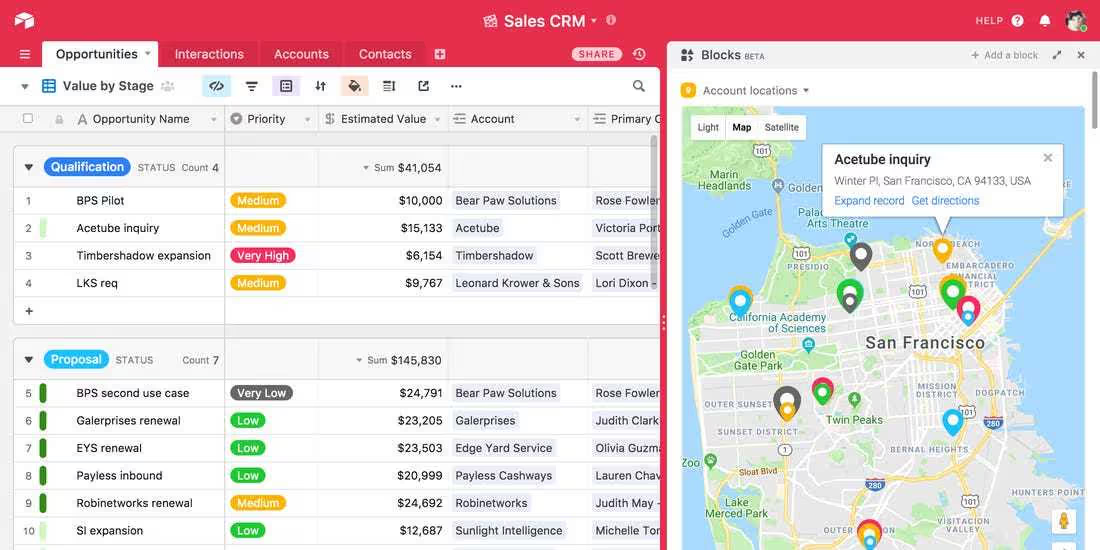
Key Benefits: Intuitive visual interface (no training needed), adjustable views (switch between grid/Kanban/calendar), Bases add extra dimensions beyond spreadsheets, detailed change tracking for collaboration, Blocks for custom functionality (PDF reports, Gantt charts, maps), AI-powered content analysis and automation.
Major Downsides: Poor media/video embedding, limited integrations (partners may use Google Sheets/Excel instead), expensive for large teams ($10/user/month+), slower with heavy data loads, weak user permission management.
Real Use Cases: Time magazine tracks production expenses and invoices with automated notifications. HubSpot saves 30 hours on Academy content collaboration. Insomniac Events uses it as CRM for lost & found (30-minute turnaround). Can serve as backend/database for simple websites without custom API.
Pricing: Free for individuals, starts at $10/user/month (annual) for teams—costs scale quickly.
Bottom Line: Well-designed solution combining spreadsheets, databases, and project management. Best for collaborative teams needing flexible data views. Consider alternatives if you need heavy media, complex permissions, or industry-standard integrations.
In the beginning
Before the talk of Airtable benefits and use cases began, it was nothing but a concept in the minds of Howie Liu, Andrew Ofstad, and Emmett Nicholas. They launched their company back in 2013 and spent three years building a prototype. Unlike most startups that try to rush the launch and make money fast, the team behind Airtable embraced the power of 'simmer' and let people sleep on the concept before releasing it into the wide world.
While unorthodox, this approach ultimately resulted in a huge success. The company turned unicorn in 2018, securing $1.1 billion of investment in a Series C funding round. From there, the solution's popularity exploded. With an impressive list of partners and customers, Airtable certainly made an impact. Time, Medium, Netflix, BuzzFeed, Expedia, and more are using this product to increase efficiency, cut costs, and increase profits. We'll talk more about Airtable use cases in a moment, but first, let's consider the benefits and pitfalls you might encounter to ensure you go into adoption with your eyes wide open.
Must-know Airtable pros and cons
The full list of Airtable benefits and features would not fit this post, as every block comes with a long list of potential advantages. Considering the most popular uses of this solution, I've created a list of crucial benefits that may bring business value for any niche or market:
Dribble, a social platform for designers, is a perfect example of a clean interface. The navigation and filter systems are both clear and make the user experience seamless, while the whole website relies on a set of consistent design elements.
Now that you are aware of the benefits of Airtable, let's talk about its downsides. According to my research and analysis of dozens of reviews, some of the biggest issues include:
If you are confident in your understanding of the pros and cons of Airtable, let's move onto adoption cases to tickle your imagination.
The best Airtable examples and use cases
Time magazine team uses Airtable as a database to keep track of production expenses, invoices, and other content-related processes. Automated email notifications integrated into the solution allow freelance team members to stay on top of their payment status. Moreover, having all information on different projects, production teams, and expenses in one place helped the executive producer, Jonathan Woods, make sense of the budget. According to him, editorial planning in Airtable helps Time create better coverage of the events across the country.

HubSpot uses Airtable benefits in a similar fashion, with a focus on team collaboration across professors working on Academy content. With formula-automated processes, the HubSpot team members use Airtable as a database and save up to 30 hours by having everyone on the same page in terms of project completion status, pacing, and more.
Using Airtable as a CRM, Insomniac Events help music lovers find their lost items quickly with a wait time of merely 30 minutes. One of the crucial factors of success was the use of select fields that reduced the number of errors and duplicates. Forms integrated into the solution enabled users to claim their lost items in-between and after concerts. Faster lost&found turnaround time translated into increased customer satisfaction. As a bonus, employees could go home earlier, resulting in a boost to their morale.
You can also use Airtable as a backend for your online project, especially if it is as simple as a directory. Unlike other solutions, Airtable lets you set up the database in hours without the need to support the API. Instead, you can devote your time to other aspects of the project. Alternatively, you could request your IT team to use Airtable to save your development time and budget. Even a year-long subscription plan might be cheaper than wasting man-hours on creating a custom API.
As you can see, Airtable is not a passing hype, but a well-thought-out and beautifully implemented solution that can benefit your business in multiple ways. Despite its shortcomings, you can use Airtable as a CRM, database, and even a backend for a simple website. Used wisely and appropriately, Airtable can be an invaluable addition to your business processes. Freshcode developers have already implemented Airtable-based solutions for multiple clients, so if you need a consultation or an estimate, contact us.

with Freshcode